Skip to content

⚙️ BALLOZI Watch Face Installation Guide (Wear OS)

Before posting a negative review on Google Play, please read this Wear OS watch face installation guide. If you encounter any issues or need support, we’re here to help you every step of the way.

📱 Method 1: Install via Companion App (Recommended)

The easiest way to install a Wear OS watch face:

  1. Connect your Wear OS device to your phone
    Ensure Bluetooth is enabled and your Wear OS device is paired.

  2. Open the BALLOZI Watch Face companion app
    Tap “Install on Wear OS device”.

  3. Confirm installation on your smartwatch
    Tap “Install” when prompted.

  4. Apply the watch face
    Your new BALLOZI watch face may apply automatically after installation.

⌚ Manually Apply the Watch Face

If the watch face doesn’t activate automatically:

  • On your watch:
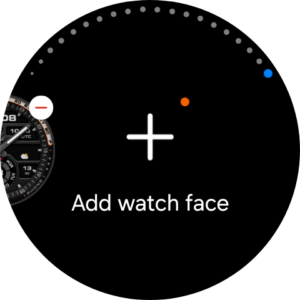
    Long press the current watch face → Swipe to the end → Tap “Add Watch Face” → Select your BALLOZI design

  • Using your phone:
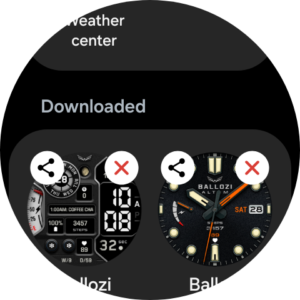
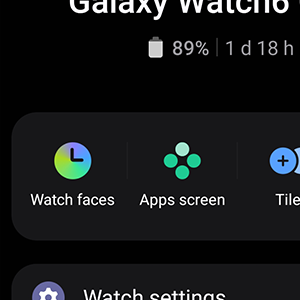
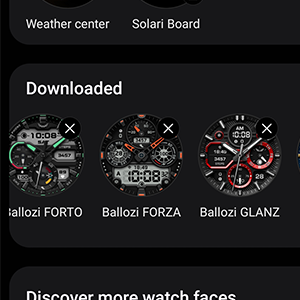
    Open the Wear OS app/Galaxy Wearable app → Go to Downloaded Watch Faces → Select your watch face

  • Via Google Play:
    Open the watch face page → Tap “Set on Watch”

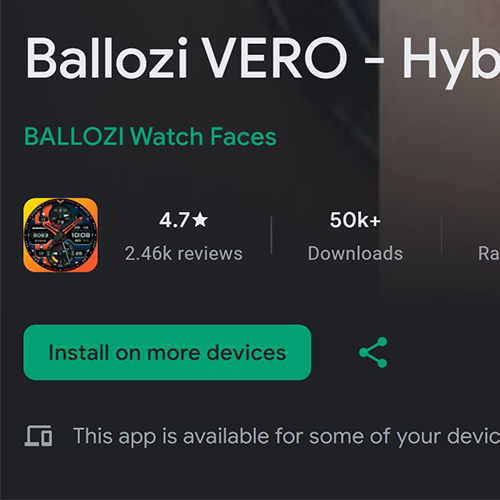
💻 Method 2: Install via Google Play (Browser)

  1. Open the watch face page on Google Play Store

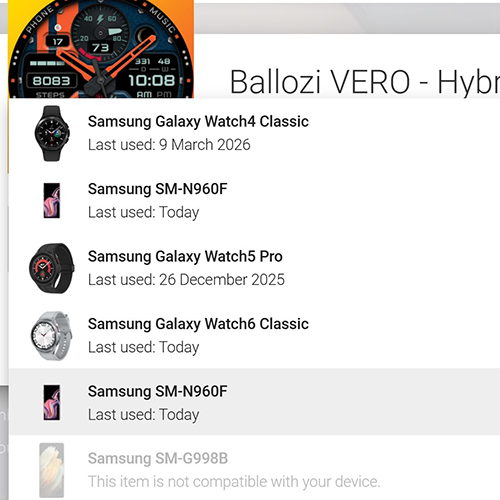
  2. Click “Install on more devices”

  3. Select your smartwatch

  4. Wait for installation, then apply it on your watch

⚠️ Important Notes & Troubleshooting

  • Same Google Account Required
    Make sure your phone and watch are using the same Google account.

  • Duplicate Payment Prompt
    If prompted to purchase again, do not worry:

    • You will NOT be charged twice

    • This is usually a sync delay between devices

    • Simply wait a few moments or restart your devices

  • Installation Delay
    It may take a few minutes for the watch face to appear on your watch.

  • Play Store Handling
    Installation and payments are managed by the Google Play Store.
    BALLOZI does not control installation errors but is here to assist you if needed.

💡 Pro Tip

For the best experience, install directly from your phone while your watch is awake, connected, and on your wrist.

🚀 Need Help?

If you encounter any issues, feel free to reach out: balloziwatchface@gmail.com
We’re committed to delivering a smooth and premium experience with every BALLOZI Watch Face.